Attaching Knowledge
Give your agent documents to answer from, such as a price list, a baggage policy or an FAQ. When a caller asks something, the agent searches the attached documents and answers from what it finds.
Where to find it: Agent Builder, Knowledgebase tab.
You upload documents once on the Knowledge Bases page. On this tab you choose which of those documents this agent may use. See Creating Knowledge Bases for how to upload them.
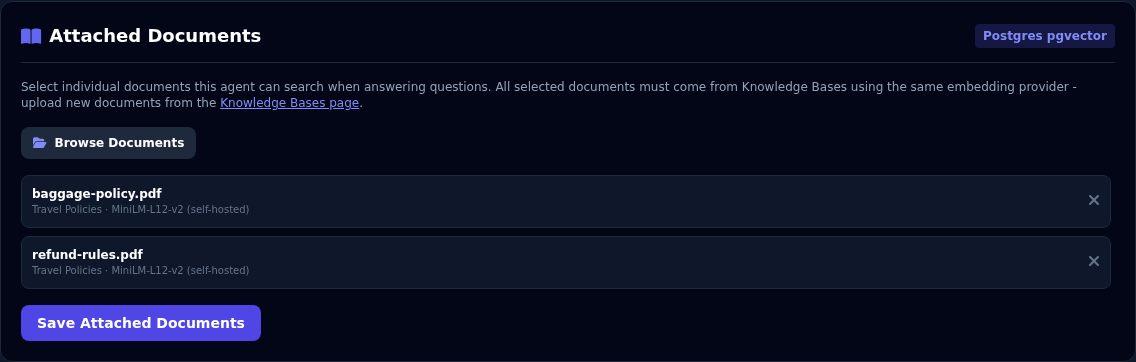
Attach documents
- Save the agent first. A new agent has to be saved once before it can have documents.
- Open the Knowledgebase tab and select Browse Documents.
- Tick the documents the agent should use. Documents are grouped by knowledge base.
- Select Add Selected. The documents appear in the list on the tab.
- Select Save Attached Documents. (Save Agent also saves them.)
To remove a document, select the x beside it, then save.
One embedding provider per agent
All the documents you attach to one agent must come from knowledge bases that use the same embedding provider. Each document shows its provider under its name. If you mix providers, Vyom refuses to save and tells you why.
How the agent uses your documents
- The agent looks in the attached documents when the caller asks something that needs a fact, such as a price, a rule or a policy.
- It is told to state numbers and facts exactly as they appear in the documents and not to guess when the documents do not say.
- Documents are searched by meaning, not by exact words, so callers do not need to use the same words as the document.
Tell the agent when to look things up
In the Agent Definition, say what the documents are for. For example: "For baggage, fees and refund questions, look in the knowledge base. If it is not there, say you do not know."
If something goes wrong
| What you see | What it means and what to do |
|---|---|
| "Save the agent first, then attach documents." | Select Save Agent, then open the tab again. |
| "No documents exist yet" | Nothing has been uploaded. Add documents on the Knowledge Bases page. |
| The agent does not know an answer that is in a document | Check the document is attached and saved. Ask the question the way a caller would, in Agent Preview. Check the document text really contains the answer. |
| Saving the documents fails with a message about providers | Choose documents from knowledge bases that use the same embedding provider. |