General Details
The General Details tab is where you describe your agent: its name, its instructions, what it says first, and its main language.
Where to find it: Agent Builder, General Details tab.
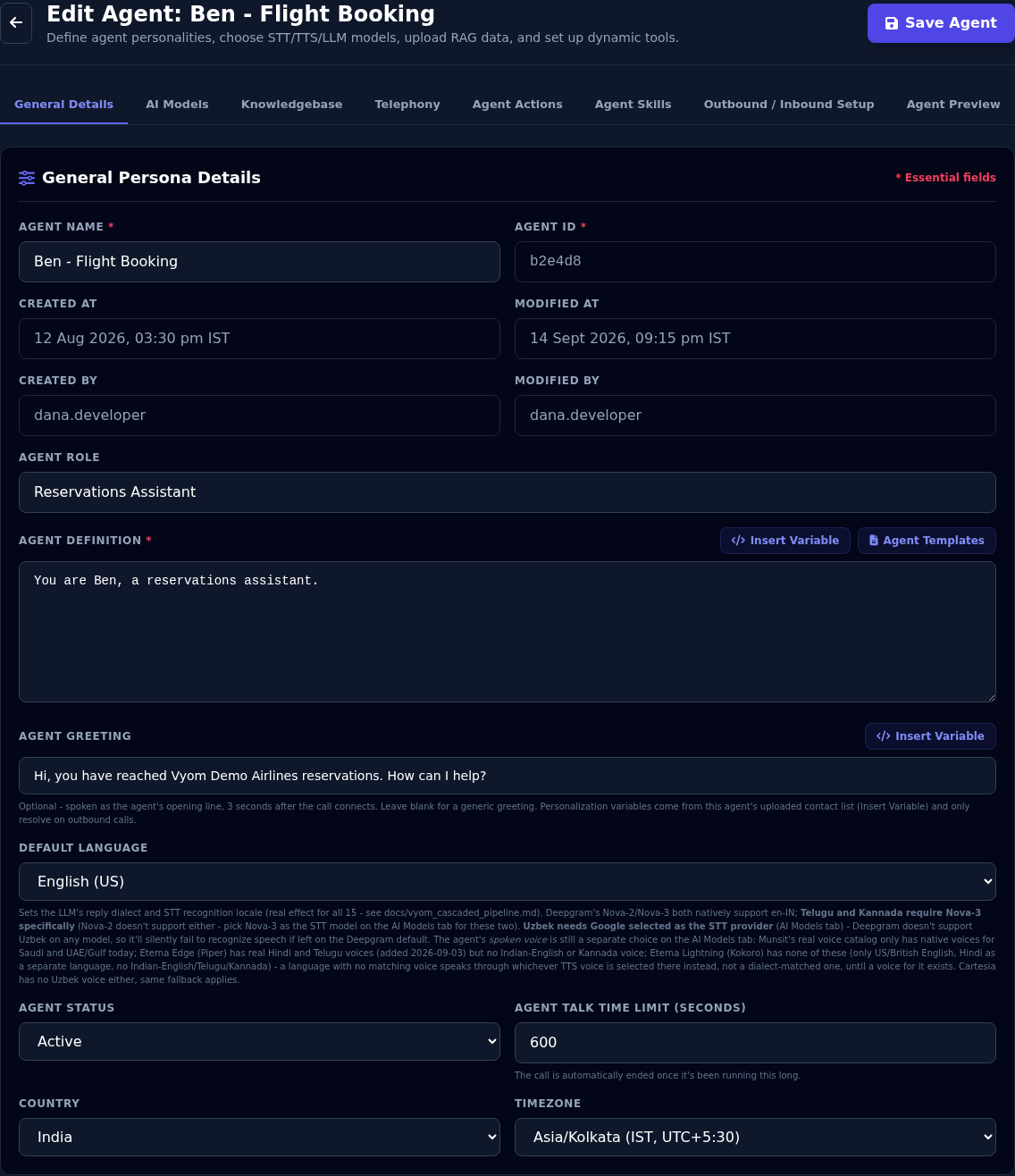
Fields
| Field | What to enter |
|---|---|
| Agent Name (required) | The name you see in lists, for example "Ava - Appointment Booking". Customers do not hear it. |
| Agent ID | Set by Vyom. You cannot change it. |
| Created At, Modified At, Created By, Modified By | Filled in by Vyom when you save. |
| Agent Role | A short job title, for example "Appointment Scheduler". It is shown on the agent's card. |
| Voice Gender | None, Female or Male. See Voice Gender below. |
| Group | Which team's agents this belongs to. Tenant Admins only. See Manage Users & Groups. |
| Agent Definition (required) | The instructions. See below. |
| Agent Greeting | The first thing the agent says. See below. |
| Default Language | The language the agent starts in. See Agents That Speak Several Languages. |
| Agent Status | Draft, Active or Inactive. See status. |
| Agent Talk Time Limit (seconds) | The longest a call can last. The call ends by itself at this limit. The default is 600 seconds (10 minutes) and the smallest value is 15. |
| Country and Timezone | Where the agent works. Scheduled outbound calls run in this timezone. See Launching Outbound Agents. |
Voice Gender
Voice Gender keeps the agent's voice consistent with who it is meant to be. It's optional: leave it at None and every voice is offered.
When you choose Female or Male:
- AI Models shows only voices of that gender.
- In languages where speakers refer to themselves differently by gender, such as Hindi, Marathi, Gujarati, Punjabi, Urdu, Bengali and Arabic, Vyom tells the agent to use the matching forms. For example, a female agent says "मैं मदद कर सकती हूँ", not "सकता हूँ". This isn't added to your Agent Definition. It only affects how the agent refers to itself, not how it addresses the caller.
If the voice doesn't match:
- An agent that isn't live (Draft or Inactive) can be saved with a voice of another gender. A warning next to AI Models tells you to choose a matching voice. It can't be set to Active until you do.
- An Active agent can never be saved with a voice that doesn't match. If you change an Active agent's Voice Gender, Vyom offers to open AI Models straight away to choose a matching voice, and saves both together, so the agent stays live. Cancel puts Voice Gender back.
Writing the Agent Definition
The Agent Definition is the most important field. It is the agent's brief. The agent follows it on every call.
A good definition covers:
- Who the agent is and which company it speaks for.
- What the agent should do, step by step.
- How it should sound: short, friendly and polite.
- What it must not do, for example "Never promise a refund."
- What to do when it cannot help, for example "Offer to transfer the caller to a person."
Write for the ear, not the eye
The agent's words are read aloud. Ask for short answers (one or two sentences) and no lists or bullet points. The ready-made templates already say this.
Example:
You are Ava, a friendly appointment scheduler for Vyom Demo Company.
Keep every answer to one or two sentences. Do not use lists.
Ask for the caller's name and the day they would like to come in.
Offer at most three free times, then confirm the one they choose.
If the caller is upset or asks for a person, say you will pass them on.
Agent Templates
Select Agent Templates to start from ready-made instructions instead of a blank box.
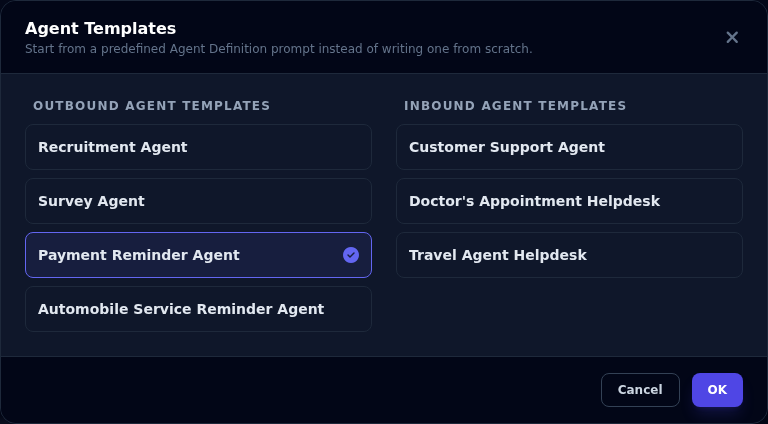
- Choose a template. There are four Outbound templates (Recruitment, Survey, Payment Reminder, Automobile Service Reminder) and three Inbound templates (Customer Support, Doctor's Appointment Helpdesk, Travel Agent Helpdesk).
- Select OK.
The template replaces whatever is in the Agent Definition box, so use it before you write your own text. If Agent Role is empty, it is filled in too. Then change the text to fit your business.
Insert Variable
Select Insert Variable to add a placeholder into the text at the cursor.
- Contact List CSV columns are placeholders such as
{{contact_list_csv.customer_name}}. On an outbound call each one is replaced with that person's value from your contact list. This list only appears after you upload a contact list. See Launching Outbound Agents. - Agent Actions lists the names of the actions you have added, so you can mention them by their exact name in the instructions.
Variables are filled in on outbound calls only. Inbound callers have no contact list.
The greeting
The Agent Greeting is the agent's opening line. It is spoken about three seconds after the call connects.
- Leave it empty for a general greeting.
- Write it in the agent's language. Right-to-left languages such as Arabic are supported.
- On outbound agents, use variables to greet each person by name, for example
Hello {{contact_list_csv.customer_name}}, this is Vyom Demo Company calling about your invoice.
Country and timezone
Choose the Country first. Vyom fills in the usual Timezone for that country. You can change the timezone afterwards. Today the country list is India, United States, United Kingdom, United Arab Emirates, Singapore and Australia.
If something goes wrong
| What you see | What it means and what to do |
|---|---|
| The Group field is missing | Only Tenant Admins see it. |
| A template replaced my text | Templates replace the Agent Definition. Use your browser's undo, or retype your text. |
| Insert Variable shows no contact columns | Save the agent and upload a contact list first. |
| The call ended by itself | It reached the Agent Talk Time Limit. Raise the limit if calls should run longer. |