DTMF Keypad Capture
Some information is easier or safer to type than to say: a date of birth, a PIN, a one-time code, the last four digits of a card. DTMF capture lets the agent ask the caller to type these digits on the phone keypad. (DTMF is the name for the tones a keypad makes.)
Where to find it: Agent Builder, Agent Actions tab, + DTMF Capture.
Works on inbound calls today
DTMF capture works when customers call you. On outbound calls it is not yet supported. You can set the action up on an outbound agent ahead of time. The console shows a notice, and the action starts working once outbound support is available.
Add a DTMF action
- Open the Agent Actions tab and select + DTMF Capture.
- Fill in the form (below).
- Select Save Action, then Save Agent.
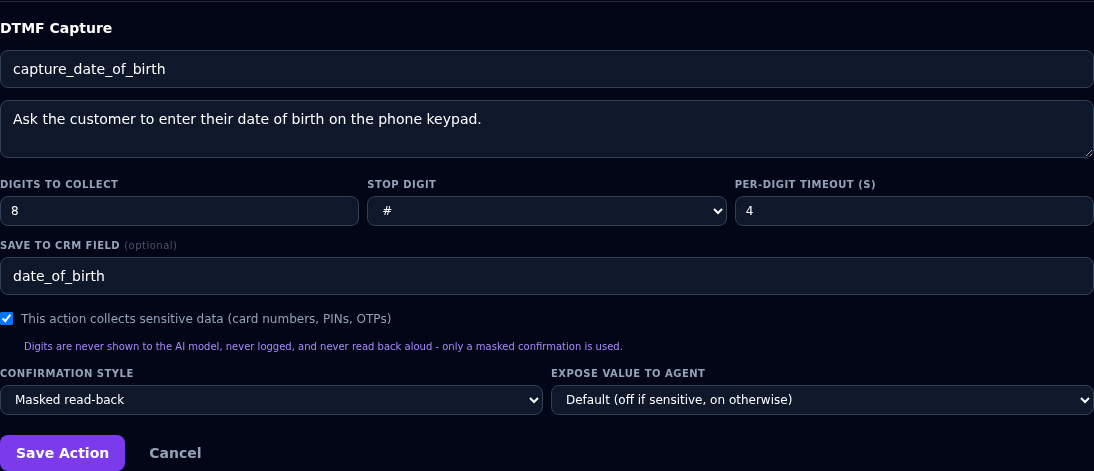
| Field | What to enter |
|---|---|
| Action name (required) | For example capture_date_of_birth. |
| Description | When to use it, for example "Ask the customer to enter their date of birth using their phone keypad." |
| Digits to collect | How many digits to expect. At least 1. Default 4. |
| Stop digit | The key the caller presses when finished: # (default), * or None. |
| Per-digit timeout (s) | How many seconds of silence before Vyom stops waiting. Default 4. |
| Save to CRM field (optional) | The name to save the digits under. See below. |
| This action collects sensitive data | Tick for card numbers, PINs and codes. See below. |
| Confirmation style | None, Spoken read-back or Masked read-back. |
| Expose value to agent | Default, On or Off. See below. |
What the caller hears and does
- The agent asks for the digits, using your description.
- The caller types them on the keypad, then presses the stop digit.
- The agent confirms, in the style you chose, and carries on.
Vyom tells the caller to press the stop digit when they finish, so that capture ends straight away. Keep # as the stop digit unless your callers cannot use it.
Sensitive data
Tick This action collects sensitive data for card numbers, PINs and one-time codes. When it is ticked:
- The digits are never shown to the AI model.
- The digits are never written to logs, and never read back aloud.
- Spoken read-back is switched off. Only a masked confirmation is possible, for example "a code ending in 4".
- The card in the list shows a Sensitive badge.
For data that is not sensitive, such as a rating from 1 to 5, leave the box clear.
Where the digits go
| You enter | What happens |
|---|---|
A name in Save to CRM field, for example date_of_birth |
The digits are saved, encrypted, with the call record under that name. |
| Nothing in that box | The digits are not stored at all. Use this for one-time codes, where the agent checks the code during the call and then forgets it. |
Saved values are not shown in the console yet
Digits saved under a field name are kept with the call record, but the console does not display them yet.
To check a one-time code, capture it without a field name, then use an HTTP Tool that asks your system whether the code is right.
Expose value to agent
This decides whether the agent itself can see the digits, so it can use them in the conversation, for example to compare a date of birth with one on file.
| Setting | Meaning |
|---|---|
| Default | Off if the action is sensitive, On otherwise. |
| On | The agent sees the digits. |
| Off | The agent only learns that the digits were collected. |
Testing
Agent Preview cannot test this. Preview uses your computer's microphone, not a phone keypad. Test DTMF capture with a real phone call to the agent.
If something goes wrong
| What you see | What it means and what to do |
|---|---|
| "Action name and a digit count of at least 1 are required." | Fill in the name and the number of digits. |
| The agent keeps asking after the caller has finished | Make sure the caller presses the stop digit. Ask the agent to remind them, in the Agent Definition. |
| The agent says it is still waiting | The caller has not pressed the stop digit, or fewer digits arrived than expected. Test the flow in Preview and on a real call. |
| Capture ends too early | Raise Per-digit timeout. |
| Nothing is captured on an outbound call | Outbound is not yet supported. |
| The notice "DTMF Capture on outbound calls isn't available yet" | You set the agent to outbound. See the note at the top of this page. |